Connect with us!

Showing posts with label app. Show all posts

Sunday, 12 January 2014

Silence your Windows Phone on schedule using the 'Quiet Hours' app!


Quiet Hours app for Windows Phone lets you to silence your phone on schedule allowing the user to sleep without any disturbance of notifications,calls,etc.The feature of controlling the volume of the ringer via an app is something new and intuitive.


The features of the app are:
  • Using it you can schedule when you want to turn silent mode on or off*. 
  • Do it manually in application. 
  • Or use toggle tile on main screen and turn mode by single click!
 Due to the Windows Phone limitation, background task can be run only once per 30 minutes, so the scheduler won't be able to set Sound volume at exact point of time.Also an in app purchase needs to be done, if you want to use scheduler. The UI is not the best we have seen.It's a simple app and we didn't find any major bugs. Overall the app is worth a try.

You can download the app(2 MB) from Windows Phone Store from here or scan the QR code present above.
Read More

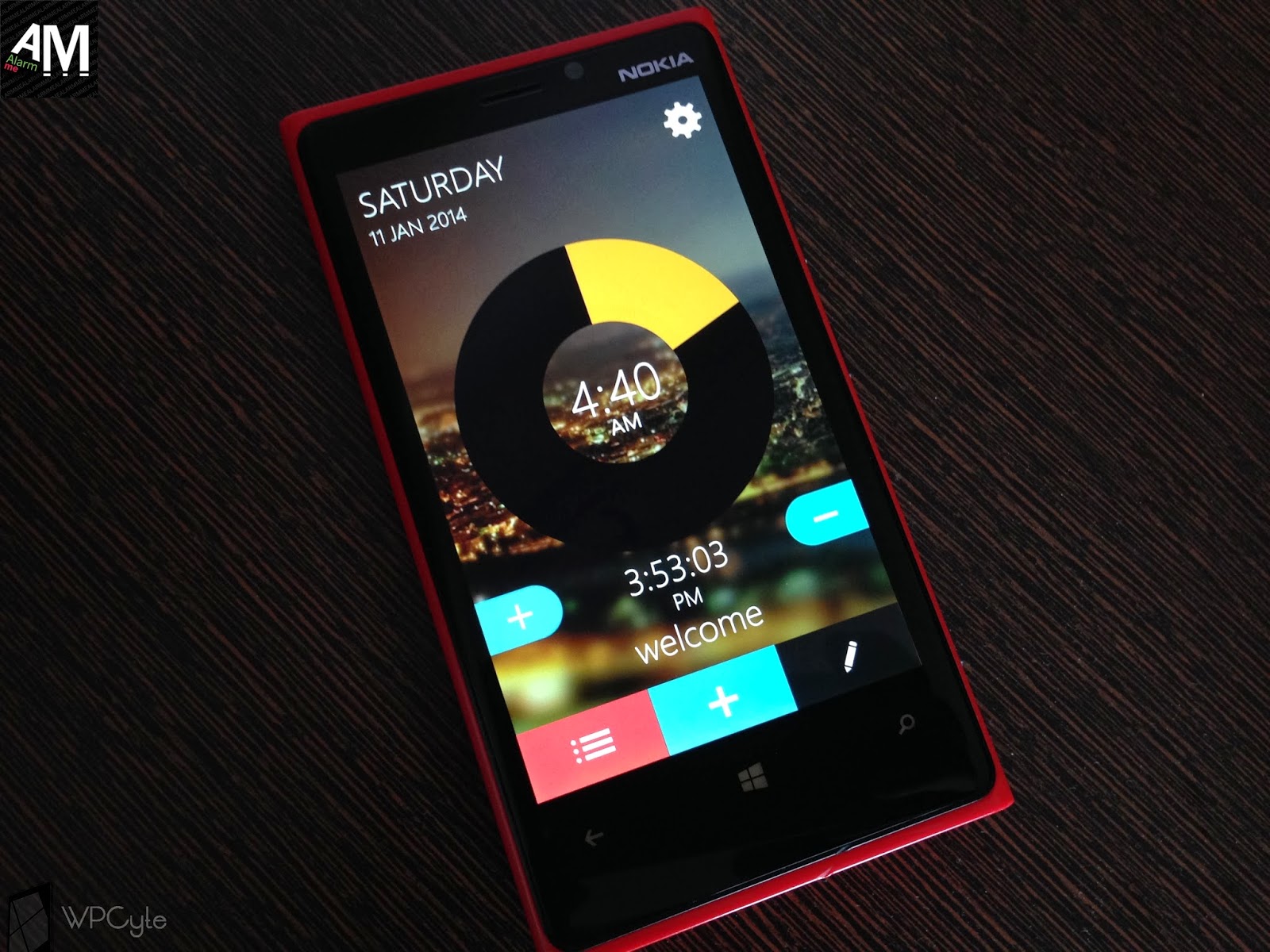
AlarmMe, a beautiful alarm alternative for Windows Phone


AlarmMe is a beautiful minimalist alarm alternative for Windows Phone. The app fuses Modern UI and colorful design elements to give you a unique viewing experience. It's way different from the traditional stock alarm present on Windows Phone.Unlike the other alarm apps, the app doesn't doesn't need run off in the background and it's great.Though we have handful of quality photography and weather apps on the windows phone store, we haven't seen much Alarm apps in the store. Trust me, its a perfect app and is worth every penny. The minimalist approach and modern UI makes it unique among other Alarm apps.


               On your first run, you will be greeted with a tutorial.The tutorial is nice and teaches you to use the app perfectly. After the tutorial you will land on a page which has a radial dial. Simply slide on the dial to change the time and double tap to set the alarm. You can add multiple alarms and can also name them intuitively. Tap on the gear for more settings. The app also has the ability to pin alarms as live tile to your start screen.One thing that I loved is the background image of the app. It's pretty awesome and is dynamic. It will change according to the time. Like the cities will be lit up if it's night(PM) and if it's a day(AM) you will see a beautiful sunny day. It's beyond explanation(I can't really explain it!) and we recommend you to give it a try. Regarding the usability, no more explanations as the  tutorial does its job pretty clean.
Main features
* Slide to a time and double tap to set the alarm
* Edit the alarm settings like repeat days, name, color etc.
* Pin your alarms to the Start screen
* Add alarms with a single tap
* Select from a list of catchy tones with more coming in future updates

Talking about the stability of the app,we found no major lags or glitches.We have been using the app for a while as we were part of the private beta of the app. We tested it on our Lumia  520,620,720 and 920. It worked perfectly on these devices. You might find some small bugs as the app is till at its early stages.Hats off to the developer for it's clean and modern UI. We have been in touch with the developer for a while and he gave some hints regarding the future updates. More tones, 24 hour system option,bug fixes,coupons for users and  beta testers,etc are some features of the upcoming updates. Let's not stress much on these right now as we will cover more about these  on future posts. Right now, use the app and let us know if you find any bugs and we will let the developer know regarding your feedback.

The app(12 MB) is available at Windows Phone store at a price tag of RS.55($0.99). A trial version of the app is also available, which is fully functional but limited to a single alarm. Buy the app, if you want to show your support towards the developer. 
Click here to download the appor scan the QR code below to download.


Let us know your feedback in the comments.
Happy Sharing! 
Read More

Monday, 6 January 2014

Federal Bank launches FedBook - an electronic passbook app!


Federal Bank India has launched an app called FedBook,a convenient and secure mobile passbook for your Federal Bank Account. Federal Bank already has an mobile banking app FedMobile but this app keeps you updated with real time transactions without the need of phone calls or SMS. The app also has options for adding tags and personalized remarks for transactions. But please do note that you need your mobile mobile number to be registered with Federal Bank for FedAlert or FedMobile facility.


Main features of the app:
  • Facility to tag transactions and add personalized remarks for transactions 
  • Search and filter facility to find a transaction. 
  • View Transactions of all operative accounts at a single window
The app is quite useful when you are on the go and is much easier than the traditional way of going to the branch and updating passbook.The UI is good and we didn't find any bugs. But we think the feature should be integrated with the FedMobile app so that customers don't have to install a separate app. So whatever it may be, we recommend Federal Bank customers among our readers to try out this app and tell us how do you feel!

You can download the FREE app(2 MB) from the store here or you can scan the QR code using your Windows Phone!

Read More

Capture your life moments using the Momento app for Windows Phone!


We all  capture our perfect moments in life and loves to memorize all those precious moments along your life. So what if an app was there to store these moments in an amazing way? Then, Momento is the app you are looking for! With "Momento" for Windows Phone 8, your photo moment will be enriched with some decorations.  You can overlay your photo with some captions, frames, stickers,effects and can share your photo moment with your family, friends and everyone.


If you are using the app for the first time, you will be greeted with a tutorial on launching the app.You can choose your moment by clicking on the Camera button or the Gallery button on the top. After selecting the image, you can choose the type of moment from the categories present.You will have options for Place,Food,Baby or event. You can later on add stickers,effects,frames,etc to make your moment more perfect. Add location and save the moment for another time. You can also share it to your friends via social networks or other media.We think its unfair if we keep on telling the app's functionality as it is pretty simple and we are sure you will get used with it within a few minutes.

The app's UI is pretty awesome and works smoothly. We found no glitches or lags and we congratulate the developers for the work.So head past the store and download the free app(4MB) by clicking the link  or scan the QR code present.  


Don't hesitate to capture your moments even if it's you are celebrating your graduation or  attending your best friend's wedding or blowing your candles birthday cake off! Capture the moments and if they are worth, we will share it on our facebook page!
Read More

Monday, 30 December 2013

Compile your codes online using the LearnComputerScience app!


Many of our readers who are majoring in computer science and other enthusiasts have asked us regarding an app that could compile codes. Our answer was no before as there were no good apps available. But right now we found an awesome app called ' LearnComputerScience' which is tailored for learning computer science right from your windows phone. The app is indeed the mobile version of the site CSpractical


The app contains:
1.Insightful Video Tutorials for clear understanding.
2.Exemplary Source Codes for practical purpose 
3.Interview Questions of many major IT firms to get better placement. 
4.Online Compiler which supports 60+ languages.
5.Comprehensive Notes for all subjects will be added soon


See what the developer of the app has to say regarding the app after the break.
"We have launched our Windows Phone app to help users to access our data with ease on Mobile Phones so as to help them and provide them FREE EDUCATION in the field of Computer Science and Programming."
On launching the app you will have options for video tutorials,Source codes,online compiler and interview questions. The most impressive feature of the app is indeed the online compiler present. It supports 60+ popular languages and is fast even in low connections. It is  of well use for professionals and students on the go. As an engineering student I personally use the app a lot for compiling C and C++ programs. The video tutorial section consists of various videos in the field of computer science from the official YouTube channel of the site. The videos sections load faster and we found no problems. The source code section comes handy as it contains some useful reference source codes. The interview question section contains interview questions from Google,Microsoft,Adobe,etc. This is also useful while preparing for interviews. Overall the app is made for learning computer science from your Windows Phone itself.

The design of the app is not the best around and we have informed the developers to improve the UI. We did feel the ads displayed at the bottom annoying as it kills smooth experience.The bright background annoys me personally and is not a pleasure to watch.But the app is worth downloading when we consider the functions it provides. It is one such of a kind and is unique. So head to the store and download the FREE app(1MB) by clicking the following link or you can scan the QR code present. Please note that the app is available only for Windows Phone 8 devices.

All computer maniacs out there, try the app and let us know the feedback!


Read More

Thursday, 26 December 2013

Create HDR images using the new 4Blend app!


4Blend is a new photography app arrived on Windows Phone store recently.The app is designed to create HDR images and uses Nokia Imaging SDK along with multi-layer HDR algorithm. The innovative multi layer HDR algorithm in the app enables users to capture better photos in even low light conditions.


The app takes three images of the same scene at different exposure levels and combines them into a image 
having greater dynamic range.Though the feature is good,it needs the phone to be kept still.The app also has voice command settings that enables to take pictures by holding the phone steady without pressing capture button. 4Blend has various effect filters to make your image more better. It also has controls similar to Nokia Camera including gamma levels,ISO,exposure,focus,etc


Key Features:-
  • Apply selection of filters to create your own unique effects ·
  • Unfiltered HDR for better photos in difficult lighting conditions · 
  • Voice activation for tripod use ·
  •  Automatic or fully customizable manual camera settings 
We tested the app on our Lumia 620 and found some bugs. These aren't much annoying, but the app definitely needs to improve in terms of stability. We felt that the app is not responsive at certain instants and we hope that it will improve in upcoming updates. There's an inbuilt tutorial, but it's not the best available if you compare with tutorials present in Nokia's photographic apps.

The app is available at Windows Phone Store free and supports non pure view devices. Grab the app(6MB) from the store here or scan the QR code present below.


Read More

Saturday, 21 December 2013

Celebrate X'mas by creating Paper Snowflakes on your Windows Phone!


First of all Merry X'mas in advance from wpCyte (wp-Hub) team! We know that you guys are busy preparing for X'mas. Our friends at Europe and United States must be pretty familiar with snow paper flake. For those who don't know, snowflake is often a traditional seasonal image or motif used around the Christmas period, especially in Europe and the United States. It represents the traditional White Christmas. During this period it is quite popular to make paper snowflakes by folding a piece of paper several times, cutting out a pattern with scissors and then unfolding it.During this Christmas season we have an exciting app for you guys called Paper Snow.


The app enables users to create paper snow flakes on your windows phone virtually by folding,cutting and opening. The app also has option for sharing your awesome work via social networks and other media.
On launching the app you will be asked for selecting the fold type and a folded paper is shown on the screen. You can create markings on Paper for cutting by drawing straight and curvy lines by touching or by using the built in shapes. After cutting you can unfold the paper to obtain your beautiful snowflake. You can give it an attractive title and can change the default wooden background with any other pictures present on your phone.After completion you can save it or you can share it to Facebook, Twitter, Instagram, or any other App installed on your Phone.

So download the free app (3MB) by following the link below and have fun creating beautiful snow flakes on your Windows Phone on this festive season. Send us your beautiful snowflakes by email to wpie@outlook.com and we will feature the top 5 handpicked ones selected by our team on our Official Facebook page. We will put on a poll among our readers and the most voted one will get an exciting Christmas gift from us. Send us your amazing snow flakes to wpie@outlook.com or meesage us on our official facebook page.So why waiting? Head to the store,download the app and start creating snowflakes!
#loveforwindowsphone


Read More

Saturday, 23 November 2013

Popular Messenger app Telegram coming to Windows Phone in January 2014


Telegram, popular messenger app has announced on twitter that a Windows Phone version of the app will be released on January 2014. The app has currently apps for both iOS and Android platforms. Telegram for iPhone was launched on August 14th this year followed by  an Android version on October 20th. The app was well reviewed and accepted on both the the platforms.


Telegram is an IM app like Whatsapp, but it differs a lot in certain features.Telegram is cloud-based, decentralized and heavily encrypted.As a result, users can access  messages from several devices and store an unlimited number of photos and videos in the cloud.The app is ad-free and has an open API and protocol free for everyone.Read out the following list about main features of Telegram:

  • Faster than any other network because of the decentralized infrastructure
  • Secure than any other IM
  • Cloud based service allows users to store and access photos and videos from several devices anywhere.
  • Secret Chats featuring end to end encryption.
  • 100% free with no ads
  • Group Chats
  • It has an open API and protocol free for anyone
We don't know how many of the above listed features will be included in the Windows Phone version. We have contacted the team for more details regarding the app and are waiting for the reply. We will update the post as soon as we get more information regarding the topic.
Meanwhile you guys stay updated and excited!
It's great to see that more and more popular services and apps are coming to Windows Phone platform.
This all shows that Windows Phone is gaining popularity day by day!

So stay tuned!
Subscribe for more exclusives and updates.
Happy Sharing!

Read More

Wednesday, 20 November 2013

Strata Review - The King of Puzzles is here on Windows Phone 8

Strata is a puzzle game from Graveck Interactive famous for their games like Jump Dewds! and Skee-Ball on Apple's iOS. Good to see a highly acclaimed developer making its way to the Windows Phone 8 Platform.
 
 
Strata is a unique puzzle game that has a perfect combination of simplicity , elegance and challenge.

Gameplay-
Puzzle consists of squares arranged in a grid which have a unique colour. The goal of the game is to strategically layer coloured ribbons in rows & columns to match the pattern of coloured squares. As simple as the rules are, the challenge lies in matching the top most ribbon with the same coloured square underneath it which becomes cumbersome as the number of grids increase.
Tutorial does an awesome job of setting out the rules of the game within a short span of time


The game starts with 2x2 grid but the number of grids increase as you progress. If you manage to complete the level without reversing your move, u get a 'Perfect' award as shown in the picture above.

Getting a 'Perfect' award requires a lot of forethought & you have to plan your strategy precisely as you don't get a second chance. Although, this can be mastered by playing the same level again
Design-
The design of Strata and its User interface is minimalist and simplistic as the Metro UI (Oops Modern UI) of Windows Phone. There are no distractions in the form of advertisements or any mindless interruptions. The transitions while swiping the ribbons are smooth. The UI consists of 3 icons- Hints, Restart and Back.


Audio-
The most striking feature of this game is the background audio which starts when you swipe the ribbon. The tempo builds up as you swipe a layer of ribbon, which fades away if u stop swiping for too long. If you make a wrong move, there is a bummer tone. These little audio changes have a pleasant effect while playing.
 
Number of levels-
The game is divided into 6 sets - Entwine, Flourish, Persist, Sundry, Prodigy and Harvest. There are a massive 396 levels in total which will take hours to complete. There is no in-app purchasing, all the levels are available when you buy the Full game.


Performance-
The game was reviewed on Lumia 920 which has 1GB RAM. There was no lag or crashes whatsoever. Although, there is a minor bug which occurs when you press back button rapidly when you are at Set 5 or 6.

Wrap Up-
The puzzle game which gets its basics right. Simplistic design & impressive audio coupled with massive number of levels, this game is a must buy in case you love puzzles. The game cost Rs.160 ($3). But not to worry, you can try the game before purchasing. Click the link here.


The review is written by Zeeshan Mhaskar, a Medical student and Diehard Gamer who enjoys playing Dota, Halo and Assassin's creed.  XBL GT - Zeeshan360
 
Review Edited by Alim Aslam.

Read More

Wednesday, 13 November 2013

Nokia Refocus app released for select Lumia devices


Nokia released the Nokia Refocus app which is a Lytro-style app for its Pureview devices. You capture an image using Refocus app and it takes the shot. The amazing bit is that you can tap anywhere on the captured image to focus on that area. Basically you don't have to worry about focusing the image before the shot is taken you can tap to focus later and get the amazing shot.

The samples of the app are included below, just tap on various areas of the images to see how it works.


Here is my attempt with the Refocus app on Lumia 920.


This not only simplifies how you take a photo, but also gives us endless editing opportunities.

Check out the video taken during Nokia World 2013.


Sami Niemi, Nokia’s director of Capture & Relive software product management explains,

“Nokia Refocus isn’t just about being able to refocus your photos on your own phone, we want you to share those stunning shots with your friends and let them refocus the shots, too! When you share these photos on Facebook or on the web, they can do precisely that.”

The app is available for the Nokia Lumia 920, Lumia 925, Lumia 1020 and  yet to be release Lumia 1520 and is available for download here.


Read More

Friday, 25 October 2013

Aamir Khan's 'Dhoom: 3' game debuts exclusively on Windows Phone


Windows Phone India have stepped up the game. Just few days back, Windows Phone released a high profile game Krrish 3 and now we have Dhoom 3, another highly awaited multi starrer sequel from Yash Raj Films.


Dhoom 3 is developed by Game Developer 99Games Online Private Limited. Its is an endless 3D moto racing game with perks and power ups. The game is very similar to AE 3D Motor game on Windows Phone store. In this version, You play the Superstar Aamir Khan of 3 idiots & Lagaan fame, whose bike you maneuver and you are chased by Abhishek Bachchan and Uday Chopra in other two bikes.


Here are the highlights of the Dhoom 3 game -
  • 3D Superbike endless racing game set against the skyline of Chicago
  • State-of-the-art graphics for slick gameplay
  • Fast paced action that will test your reflexes
  • Responsive Accelerometer and Tap Controls to steer you to victory
  • In-Game coins can be used to buy cool bikes, racing suits and Power-Ups
  • Nitro boosts will enable extreme speed
  • Sonic Pulse blasts will clear your way
  • Shields will protect you


The gameplay is quite nice and smooth. The control is responsive which allows you to play the game without any issue. With simple Tilt and Tap control, enjoy hours of fun filled action in this 3D endless racing game.

So, Go ahead and Download the game here.


Read More

Thursday, 17 October 2013

Beatphonic - Revolutionary Music App from the Land of Nokia


Windows Phone is an amazing platform which has created a diverse stage for itself to compete against the likes of iOS and Android. Its innovative and stylish UI makes it a unique mobile platform among millions. But even an Emperor needs its cavalry to win any battle. And in the Smartphone world, an OS platform needs apps to win over consumers. But let’s not discount Hardware in this picture.

Nokia and Microsoft are slowly bringing the much needed apps to the platform except a few, who are just adamant. (wink wink "Instagram"). But not to worry, we have better than official Instagram app in the form of 6tag by Rudy Huyn. Many other independent developers and companies are now open to the idea of developing apps for Windows Phone OS. Soundical is one of them.


Beatphonic is developed by Soundical. A new, innovative Finnish company that up till now developed music-related mobile applications and software for iOS platform alone. Jukka Rauhala, the CEO of Soundical, has a PhD in audio signal processing & was previously developing audio algorithms for Nokia but always wanted to develop “an audio engine that is flexible and allows to synthesize and modify stuff in real time.”  Beatphonic is the first WP8 app developed by this finish company.
 
The app create amazing beats and music instantly with physical movements. The app utilizes a simple UI which makes it very easy to produce very unique music. Its fun and requires no musical expertise. The app have immense potential.


Beatphonic features:
  • Use physical gestures to control the music!
  • 16 high quality instruments with four alternative styles
  • Over 65,000 different combinations of instruments and styles!
  • 9 cool sound effects
  • Adjustable tempo
  • Predefined chord patterns – you can also change the chords manually
  • Record your own songs
  • Upload recorded songs to SoundCloud
  • Post recorded songs to Facebook


If you are someone who listens to music and enjoys it, Please go ahead and Download the app now. Open Beatphonic and you are on your way to creating your own funky music! Record your own song, upload it to SoundCloud, and post it to Facebook - let your friends hear it and be impressed!

Here are a few examples of songs made using Beatphonic:


Its available now on Windows Phone 8 and its FREE.
 
Download here and Remember, we were first to report about this amazing app to the Windows Phone World. 


Please leave your feedback about the app in the comment sections.

Did you like the article? Please leave your feedback so that we can improve.

Source: Soundical & Arctic Startup

 
Read More

Thursday, 10 October 2013

Glance Background - (Nokia Lab Beta App)


Do you have Amber updated installed on your Lumia 925/920/1020/820/720/620.?

Do you use Glance on your phone and love the clock appearing when the screen is in sleep mode?

Well, then you will love this amazing Glance Background Beta app from Nokia Lab. It customizes the Glance screen on your Lumia with a personalized background image.  Choose from several preloaded images or create your own.

Key features

  • Select up to four images to rotate as your Glance background
  • Choose from several high-quality preloaded images
  • Create new backgrounds from your own pictures
  • Optimize your images with a simple editor (preset effects, colorize, zoom)
  • Save modified images for later use


Known limitations and issues:

  • This application requires the Lumia Amber software update.
  • This app will not work with Nokia Lumia 520 or Nokia Lumia 625 since they don't support Glance screen
  • This app is initially only available in English
  • On the Nokia Lumia 920, Nokia Lumia 720, and Nokia Lumia 620, you may observe flicker especially with images containing large areas of bright colours
  • Settings >> glance needs to be on for backgrounds to appear
  • Glance Background will increase your overall power consumption. This will vary from one device model to another due to the display size, technology and nature of the selected image.
  • This beta release of Glance Background is offered as a standalone app to allow for easier installation (and removal).  Combining these features into Settings is a longer-term possibility and depends on the results of this beta trial among other things.

You can login to Nokia beta site and download the app. Link is here

The Direct link for the app is here   & QR Code is down below.

Please let us know your feedback about the app in the comment section.


Read More

Wednesday, 2 October 2013

Windows Phone exclusive SongArc game is finally here (Update: Link available)


SongArc is a social music game for Windows Phone with a gameplay that brings you intimately close to the music. Its now available for all.

*** Free for the first month ***  DOWNLOAD LINK


Tired of bad rhythm and music games that have nothing to do with the real music? Do you want to get real close to your favorite songs? With SongArc, you can feel as if you were playing a real instrument!

By picking music from your library, you can load up sheets to enable a fast paced rhythm matching game, perfect for playing anytime.


The developers have done are great job in the graphics department, with an eye catching and intuitive UI. Next up, you can bring your own music to the game—who doesn’t want that? Finally, if your song isn't programmed for play, you can just make a “sheet” for it and you’re good to go.

Here is the tutorial video to show how to create a sheet.


Music, fun and creativity? All checked off.

SongArc will be available for FREE FOR ONE MONTH for Windows Phone 7.x (except 256 MB ones) and Windows Phone 8 devices.

Features:
- Unique, ergonomically designed gameplay which is easy to learn but difficult to master – you never thought music games can be this fun on a phone!
- Play with any songs you have on your phone
- Create new Sheets for your songs to play with
- Share your best Sheet creation for others to play with
- Share your scores on social networks


LINK:  http://www.windowsphone.com/en-us/store/app/songarc/e03d0342-1fb6-45bc-bea9-5ea10c36da0d


So what do our readers think about the Game?

Do leave your feedback and queries here. As we were part of the Beta team of this game, we will be able to help you with some issues.

Source: SongArc (Facebook)

 
Read More
© wp-Hub All rights reserved | Theme Designed by Seo Blogger Templates